


Learn More About Free POS Placement
🧩 Flexible Software Plans Starting @ $29.95 / mo.
🍀 See All Clover Software Plans
⭐ 5-Star Trust, Backed by Real Reviews
👨💼 Expert Setup & Training Included — Meet Your Expert
📞 Call/Text a Real Person in the U.S.
📄 One per new customer. The equipment is provided for use with the merchant service. The amount paid today covers shipping and setup. terms & conditions.
Get a Free Clover Solo Just pay $99 shipping & setup
Get a Clover Station Solo through Limelight Payments’ POS Equipment Placement Program. The hardware is provided at no upfront hardware cost with an approved new merchant account. You pay a one-time $99 shipping and setup fee.
A Limelight POS expert contacts you to confirm your business and review the program. If your merchant account is not approved, the full $99 is refunded. The equipment remains placement equipment and must be returned if service is cancelled or terminated.

30+ Google reviews
A real U.S.-based POS expert reviews the account and helps with setup and training.
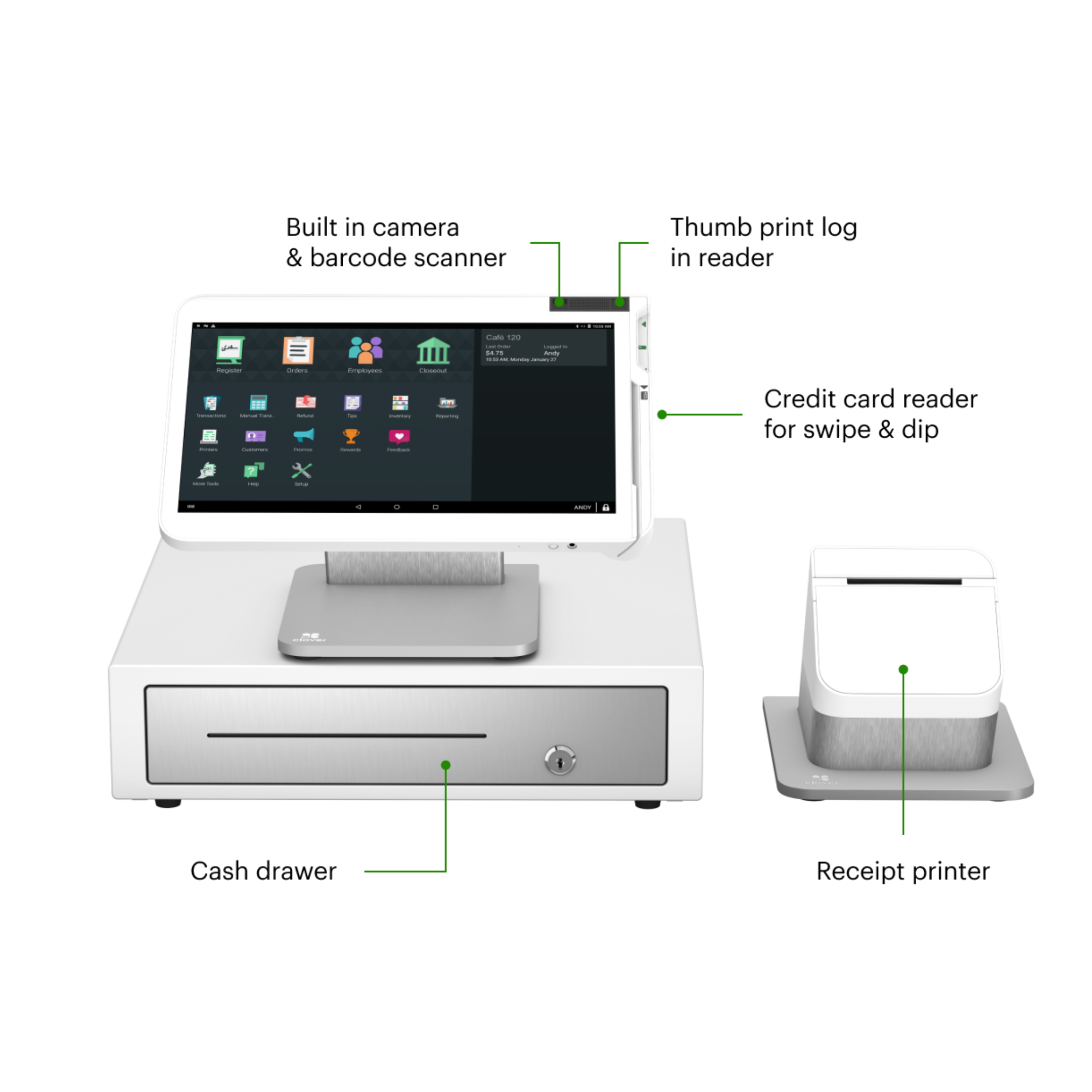
The Solo includes a 14-inch merchant touchscreen, full-size receipt printer, cash drawer, and support for a connected Clover payment device.
Clover Station Solo for a one-time $99 shipping and setup fee.
The Clover Station Solo hardware is provided at no upfront hardware cost for use with an approved Limelight Payments merchant account. The $99 paid at checkout covers shipping and standard setup. A $39 monthly placement fee applies, but it is waived when your business processes more than $20,000 per month. If the business is not approved, the full $99 is refunded.
Receive a Clover Station Solo through the POS Equipment Placement Program after merchant approval.
The one-time charge covers shipping, activation preparation, and the standard onboarding included with this offer.
The monthly placement fee is waived when your business processes more than $20,000 per month.
Limelight helps configure your menu or inventory, employees, taxes, tips, receipt settings, and basic Clover workflow.
If the business does not qualify for the required merchant account, the complete $99 charge is refunded.
Call or text a real Limelight POS expert for onboarding, equipment, deposits, statements, and ongoing Clover support.
Anyone can sell you Clover. Limelight includes a real Clover Expert — for FREE!
The equipment may be the same, but the setup, pricing guidance, and support experience can be completely different.

Limelight sells a complete Clover service — not just the equipment.
Simple placement program terms.
The Clover Station Solo is provided for use with an approved Limelight Payments merchant account. The $99 charge covers shipping and standard setup. A $39 monthly placement fee applies and is waived when monthly processing exceeds $20,000.
Standard merchant underwriting and program eligibility apply.
If the merchant account is not approved, the complete $99 charge is refunded.
Ownership does not transfer. The Solo must be returned if service is cancelled or terminated.
What the Clover Station Solo Gen 2 does
A full-size countertop Clover POS built for fast order entry, employee management, reporting, and running your business from a fixed checkout counter. Here's what's included:
Large, bright touchscreen for fast order entry, menu navigation, and staff workflow. Designed for high-volume counter use.
A streamlined merchant-facing setup for businesses that do not need a dedicated customer-facing display at checkout.
Accept card payments through a compatible connected Clover payment device configured with your Station Solo setup.
High-speed thermal receipt printer with auto-cut. The separate full-size printer is designed for reliable countertop use and easy paper-roll replacement.
Fast biometric employee switching at the counter. No PIN to remember, no shared logins, and accurate sales-by-employee tracking.
Plug-and-play with standard 24V trigger cash drawers. Drawer opens automatically on cash transactions and supports end-of-day cash reporting.
Create menu items, organize categories, add modifiers, and customize your Clover Station Solo for the way your business takes orders.
Add customer loyalty tools, promotions, rewards, and gift card options to help bring customers back again.
Homebase is included with the Essentials plan, giving you tools for employee scheduling, schedule change requests, time tracking, and payroll-ready hour reports.
From $99 to live POS in 4–5 business days.
Pay $99 today. A real POS expert calls within 1 business day. Approved → your Clover Station Solo ships in 2–3 days and we set everything up over the phone. Not approved → full $99 refund. Zero risk.
Clover Station Solo works for almost every small business.
Find your industry below for setup recommendations and integrations tailored to your workflow.
Free Clover Station Solo from Limelight vs. Clover Direct, other resellers, or Square.
All four sell or service the Clover Station Solo. Here's the side-by-side.
| Limelight Payments | Clover Direct | Other Clover Resellers | Square | |
|---|---|---|---|---|
| Clover Station Solo hardware cost | ✓ Free ($99 ship) | ✗ Retail about $1,745 | ✗ Varies | ✗ N/A |
| Processing Fees |
Choose from: • Flat rate starting at 1.55% • Pay 0% with Cash Discount • Wholesale Interchange-Plus pricing |
Flat Rate 2.6% + 10¢ | Tiered Pricing Less transparent Rates as high as 6% |
Flat 2.5% + 15¢ |
| Free menu & inventory setup | ✓ Yes | ✗ DIY or paid | ✗ Limited | ✗ DIY |
| Direct line to your account manager | ✓ Direct phone support | Call center | Branch + call center | Email/chat |
| USA-based support | ✓ Yes | Mixed | Yes | Mixed |
| Approval speed | ~1 business day | 1–3 days | 1–5 days | Instant (limits apply) |
| Risk of frozen funds | Low (real merchant account) | Low | Low | High (aggregator model) |
5 stars across restaurants, retail, salons, and services.
"Someone online told me that if I was going to get a Clover system, I should go through a trusted sales rep — and that was the best advice I could've received. Ryan helped with everything: setting up my menu, uploading my inventory, and even integrating my gift cards."
"I've been in business for over 20 years using credit card processors and Ryan is by far the most knowledgeable, helpful individual I have ever used."
"I used Limelight Payments for my pressure washing business. If I have a question, Ryan still answers the phone or returns my call. I don't get tossed around with customer service reps."
"He is honest, accessible, fast to help. I have been with Clover for more than two years now (I have a 15-year-old business) and provided all the support I needed."
Clover Station Solo — technical specs
Everything inside the device. Verify against Clover's current spec sheet for the most up-to-date details.
| Merchant display | 14-inch HD touchscreen for order entry, reporting, employee management, and daily business operations |
| Customer display | Not included; Clover Station Solo uses a single merchant-facing display |
| Payment device | Works with a compatible connected Clover payment device configured with the merchant account |
| Operating system | Clover OS |
| Receipt printer | Separate full-size thermal receipt printer with auto-cut |
| Cash drawer | Compatible cash drawer included or available depending on the configured package |
| Employee access | Supports employee logins, permissions, time tracking, and sales-by-employee reporting |
| Connectivity | Designed for countertop use with network connectivity configured during setup |
| Power | AC-powered countertop operation; not battery powered |
| Best for | Restaurants, retail stores, salons, professional services, medical offices, dental offices, and other fixed-counter businesses |
| Warranty | Merchant may be eligible for up to one free replacement per year for a defective Clover Station Solo while enrolled in the POS Placement Program. Lost, stolen, or physically damaged equipment is not covered. |
Frequently asked questions
How much does the Clover Station Solo cost through this program?
The Clover Station Solo hardware is provided at no cost for use with an approved Limelight Payments merchant account. The one-time $99 charge covers setup and shipping. A $39 monthly placement fee applies and is waived when monthly processing exceeds $20,000. The equipment does not transfer ownership and remains the property of Limelight Payments.
Is the Clover Station Solo really free?
Yes, the Clover Station Solo hardware is provided at no cost while you are actively processing with Limelight Payments through the POS Equipment Placement Program. You pay a one-time $99 setup and shipping fee. A $39 monthly placement fee applies and is waived when monthly processing exceeds $20,000. This is not a hardware purchase, and ownership of the equipment does not transfer to the merchant.
What is the $39 monthly Clover Station Solo placement fee?
The Clover Station Solo placement program includes a $39 monthly placement fee for businesses processing less than $20,000 per month. The $39 monthly placement fee is waived when your business processes more than $20,000 per month. If the Solo placement fee is more than you need, the Clover Mini placement program has a $19 monthly placement fee that is waived above $10,000 per month, and the Clover Flex placement program has no monthly placement fee.
Why is there a $99 charge if the Clover Station Solo is free?
The $99 charge covers setup and shipping. The Clover Station Solo hardware itself is provided for use with your approved Limelight Payments merchant account through the POS Equipment Placement Program.
Can I buy the Clover Station Solo for $99 without processing through Limelight Payments?
No. The $99 offer is part of the Limelight Payments POS Equipment Placement Program. The Clover Station Solo is provided for use with an approved Limelight Payments merchant services account. It is not a $99 hardware purchase.
Who owns the Clover Station Solo?
The Clover Station Solo remains the property of Limelight Payments. The merchant is allowed to use the equipment while actively enrolled in the POS Equipment Placement Program and processing through Limelight Payments.
What happens if I cancel service or my merchant account is terminated?
If you cancel service or your merchant account is terminated, Limelight Payments will provide a return shipping label so you can return the equipment. If the equipment is not returned within 10 days of receiving the return shipping label, you may be charged the full retail value of the Clover Station Solo.
Do you provide the return shipping label?
Yes. If you cancel service or your merchant account is terminated, Limelight Payments will provide a return shipping label for the equipment. The Clover Station Solo must be returned within 10 days of receiving the return shipping label to avoid being charged the full retail value of the device.
What happens after I place the $99 order?
After you place the order, a Limelight Payments POS expert will contact you to confirm your business details, review the program requirements, and help complete the merchant account setup. If your business is approved, the Clover Station Solo will be shipped and we will help you get set up.
What if my business is not approved?
If your business is not approved for the Limelight Payments merchant account program, your $99 setup and shipping fee will be refunded.
Where can I buy a Clover Station Solo?
You can get a Clover Station Solo through Clover directly, through certain banks, or through authorized Clover resellers like Limelight Payments. One important thing to understand is that Clover devices are generally tied to the merchant processor that sells or places the equipment. In most cases, you cannot buy a Clover from one processor and use it with another processor later. That means you are not just choosing where to get the device — you are choosing the company that will handle your processing, setup, support, and long-term service.
What processing fees does Limelight Payments charge?
Limelight Payments offers multiple processing options, including wholesale interchange-plus pricing, flat-rate pricing, and compliant cash discount programs where eligible. Exact pricing depends on your business type, card mix, average ticket, and approval. We will review your options before finalizing the account.
What industries qualify for the Clover Station Solo Placement Program?
The program is available to many legitimate business types, including restaurants, food trucks, retail stores, salons, service businesses, mobile businesses, and more. Approval is subject to merchant underwriting and program eligibility.
What if the Clover Station Solo stops working?
Merchants enrolled in the POS Equipment Placement Program may be eligible for up to one free replacement per year for a defective Clover Station Solo. Replacement eligibility applies to manufacturer defects or device failure under normal use. Lost, stolen, physically damaged, or intentionally damaged equipment is not covered.
Does the Clover Station Solo include a customer-facing display?
No. The Clover Station Solo is a single-screen countertop POS system. Businesses that want a dedicated customer-facing display should consider the Clover Station Duo instead.
Does the Clover Station Solo work with a cash drawer?
Yes. The Clover Station Solo is compatible with standard 24V trigger cash drawers. The drawer opens automatically on cash transactions, and the Solo provides full cash reporting at end of day. If you do not already have a cash drawer, we can recommend a compatible model during setup.
Does the Clover Station Solo include a receipt printer?
Yes. The Clover Station Solo package includes a separate full-size thermal receipt printer with auto-cut. The separate printer is designed for reliable countertop use and easy paper-roll replacement.
How fast can I receive the Clover Station Solo?
Once your merchant account is approved and the program details are confirmed, the Clover Station Solo typically ships within a few business days. Most merchants receive the Clover Station Solo within 3-4 business days of finalizing their application. Timing may vary based on underwriting, shipping, and equipment availability.