


Get one Clover Duo POS Placement
$99 one-time shipping & setup
Software plans start at $29.95/mo
Expert Setup & training included
Direct U.S.-based support
Merchant account approval required
One per new customer. The equipment is provided for use with the merchant service. The amount paid today covers shipping and setup. The equipment must be returned in accordance with the program terms & conditions.
Get a Free Clover Duo Just pay $99 shipping & setup
Get a Clover Station Duo Gen 2 through Limelight Payments’ POS Equipment Placement Program. The hardware is provided at no upfront hardware cost with an approved new merchant account. You pay a one-time $99 shipping and setup fee.
A Limelight POS expert contacts you to confirm your business and review the program. If your merchant account is not approved, the full $99 is refunded. The equipment remains placement equipment and must be returned if service is cancelled or terminated.
30+ Google reviews
A real U.S.-based POS expert reviews the account and helps with setup and training.
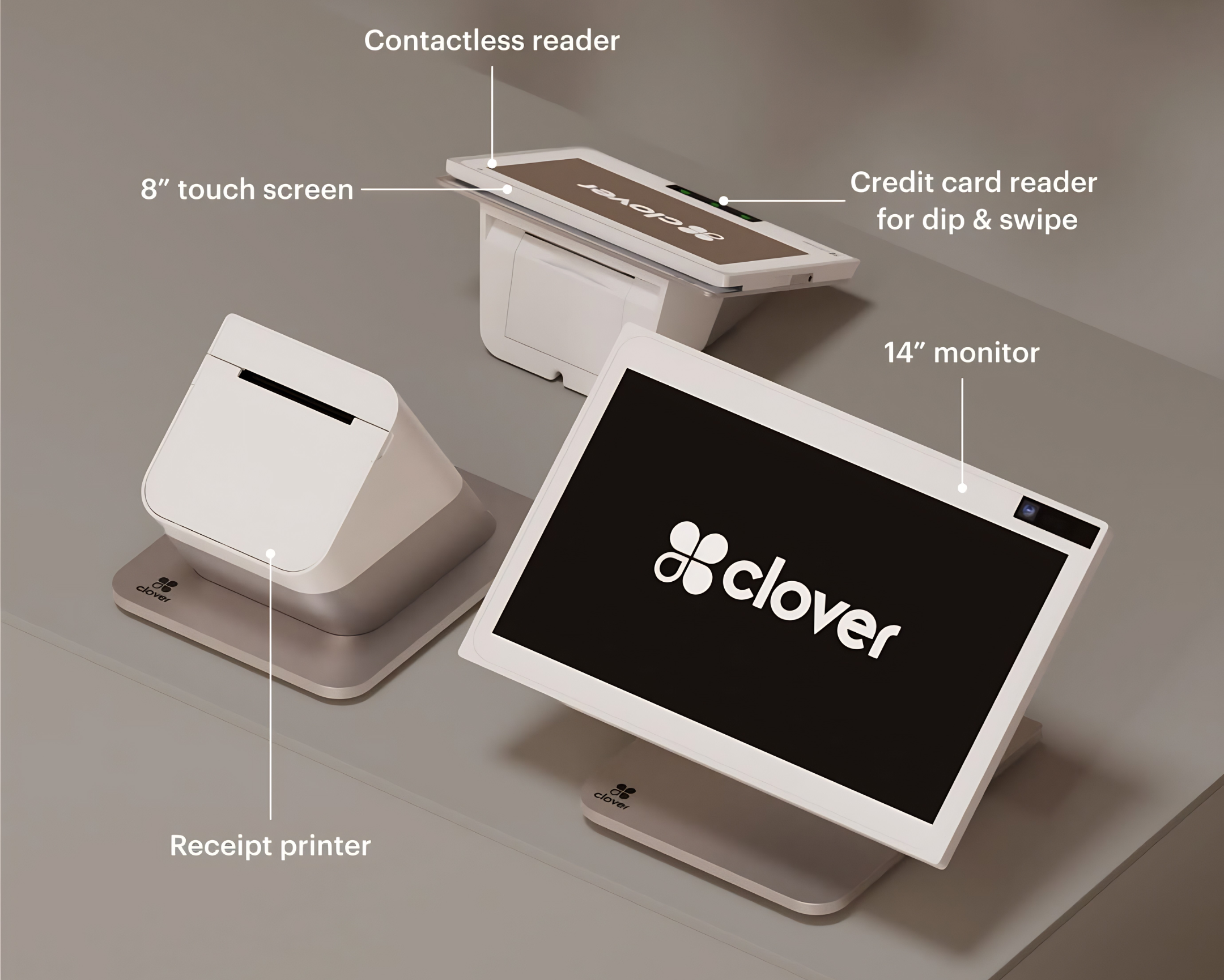
The Duo includes a 14-inch merchant display, customer-facing payment screen, built-in receipt printer, integrated card reader, and cash-drawer compatibility.
Clover Station Duo Gen 2 for a one-time $99 shipping and setup fee.
The Clover Station Duo Gen 2 hardware is provided at no upfront hardware cost for use with an approved Limelight Payments merchant account. The $99 paid at checkout covers shipping and standard setup. A $39 monthly placement fee applies, but it is waived when your business processes more than $20,000 per month. If the business is not approved, the full $99 is refunded.
Receive a brand-new Clover Station Duo Gen 2 through the POS Equipment Placement Program after merchant approval.
The one-time charge covers shipping, activation preparation, and the standard onboarding included with this offer.
The monthly placement fee is waived when your business processes more than $20,000 per month.
Limelight helps configure your menu or inventory, employees, taxes, tips, receipt settings, and basic Clover workflow.
If the business does not qualify for the required merchant account, the complete $99 charge is refunded.
Call or text a real Limelight POS expert for onboarding, equipment, deposits, statements, and ongoing Clover support.
Anyone can sell you Clover. Limelight includes a real Clover Expert — for FREE!
The equipment may be the same, but the setup, pricing guidance, and support experience can be completely different.

Limelight sells a complete Clover service — not just the equipment.
Simple placement program terms.
The Clover Station Duo is provided for use with an approved Limelight Payments merchant account. The $99 charge covers shipping and standard setup.
Standard merchant underwriting and program eligibility apply.
If the merchant account is not approved, the complete $99 charge is refunded.
Ownership does not transfer. The Duo must be returned if service is cancelled or terminated.
What the Clover Station Duo Gen 2 does
A dual-screen counter Clover POS built for fast checkout, customer engagement, employee management, and running your business from a fixed counter. Here's what's inside:
Large, bright touchscreen for fast order entry, menu navigation, and staff workflow. Designed for high-volume counter use.
Customer-facing screen for order review, tip selection, signature capture, loyalty rewards, and digital receipt email.
Built-in EMV chip reader, NFC contactless payments like Apple Pay and Google Pay, and magnetic stripe reader on the customer display.
High-speed thermal receipt printer with auto-cut. The separate full-size printer is designed for reliable countertop use and easier paper-roll replacement.
Fast biometric employee switching at the counter. No PIN to remember, no shared logins, and accurate sales-by-employee tracking.
Plug-and-play with standard 24V trigger cash drawers. Drawer opens automatically on cash transactions and supports end-of-day cash reporting.
Create menu items, organize categories, add modifiers, and customize your Clover Station Duo for the way your business takes orders.
Add customer loyalty tools, promotions, rewards, and gift card options to help bring customers back again.
Homebase is included with the Essentials plan, giving you tools for employee scheduling, schedule change requests, time tracking, and payroll-ready hour reports.
From $99 to live POS in 4–5 business days.
Pay $99 today. A real POS expert calls within 1 business day. Approved → your free Clover Station Duo ships in 2–3 days and we set everything up over the phone. Not approved → full $99 refund. Zero risk.
Clover Station Duo works for almost every small business.
Find your industry below for setup recommendations and integrations tailored to your workflow.
Free Clover Station Duo from Limelight vs. Clover Direct, banks, or Square.
All four sell or service the Clover Station Duo. Here's the side-by-side.
| Limelight Payments | Clover Direct | Other Clover Resellers | Square | |
|---|---|---|---|---|
| Clover Station Duo hardware cost | ✓ Free ($99 ship) | ✗ Retail $1,999 | ✗ Varies | ✗ N/A |
| Processing Fees |
Choose from: • Flat rate starting at 1.55% • Pay 0% with Cash Discount • Wholesale Interchange-Plus pricing |
Flat Rate 2.6% + 10¢ | Tiered Pricing Less transparent Rates as high as 6% |
Flat 2.5% + 15¢ |
| Free menu & inventory setup | ✓ Yes | ✗ DIY or paid | ✗ Limited | ✗ DIY |
| Direct line to your account manager | ✓ Direct phone support | Call center | Branch + call center | Email/chat |
| USA-based support | ✓ Yes | Mixed | Yes | Mixed |
| Approval speed | ~1 business day | 1–3 days | 1–5 days | Instant (limits apply) |
| Risk of frozen funds | Low (real merchant account) | Low | Low | High (aggregator model) |
5 stars across restaurants, retail, salons, and services.
"Someone online told me that if I was going to get a Clover system, I should go through a trusted sales rep — and that was the best advice I could've received. Ryan helped with everything: setting up my menu, uploading my inventory, and even integrating my gift cards."
"I've been in business for over 20 years using credit card processors and Ryan is by far the most knowledgeable, helpful individual I have ever used."
"I used Limelight Payments for my pressure washing business. If I have a question, Ryan still answers the phone or returns my call. I don't get tossed around with customer service reps."
"He is honest, accessible, fast to help. I have been with Clover for more than two years now (I have a 15-year-old business) and provided all the support I needed."
Clover Station Duo Gen 2 — technical specs
Everything inside the device. Verify against Clover's current spec sheet for the most up-to-date details.
| Merchant display | 14-inch HD touchscreen (1920 × 1080), capacitive multi-touch |
| Customer display | 8-inch HD customer-facing touchscreen — for orders, tips, signatures, rewards |
| Processor | Octa-core, 64-bit |
| Operating system | Clover OS (Android-based) |
| Memory | 4 GB RAM / 64 GB storage |
| Payment methods | EMV chip, NFC contactless (Apple Pay, Google Pay), magnetic stripe |
| Connectivity | Wi-Fi 802.11 a/b/g/n/ac, Ethernet, Bluetooth 5.0, optional 4G LTE backup |
| Receipt printer | Built-in thermal printer with auto-cut (paper roll included) |
| Fingerprint reader | Built-in fingerprint reader for fast employee login |
| Cash drawer | Compatible with standard 24V trigger cash drawers |
| Barcode scanning | Built-in 5MP rear camera for QR codes; optional handheld scanner add-on |
| Power | AC adapter (corded — not battery powered) |
| Mounting | Counter-mounted with dual swivel arm |
| Warranty | Merchant may be eligible for up to one free replacement per year for a defective Clover Station Duo while enrolled in the POS Placement Program. Lost, stolen, or physically damaged equipment is not covered. |

Frequently asked questions
How much does the Clover Station Duo cost through this program?
The Clover Station Duo hardware is provided at no cost for use with an approved Limelight Payments merchant account. The one-time $99 charge covers setup and shipping. The equipment does not transfer ownership and remains the property of Limelight Payments.
Is the Clover Station Duo really free?
Yes, the Clover Station Duo hardware is provided at no cost while you are actively processing with Limelight Payments through the POS Equipment Placement Program. You pay a one-time $99 setup and shipping fee. This is not a hardware purchase, and ownership of the equipment does not transfer to the merchant.
What is the $39 monthly Clover Station Duo placement fee?
The Clover Station Duo placement program includes a $39 monthly placement fee for businesses processing less than $20,000 per month. The $39 monthly placement fee is waived when your business processes more than $20,000 per month. If the Duo placement fee is more than you need, the Clover Mini placement program has a $19 monthly placement fee that is waived at more than $10,000 per month, and the Clover Flex placement program has no monthly placement fee.
Why is there a $99 charge if the Clover Station Duo is free?
The $99 charge covers setup and shipping. The Clover Station Duo hardware itself is provided for use with your approved Limelight Payments merchant account through the POS Equipment Placement Program.
Can I buy the Clover Station Duo for $99 without processing through Limelight Payments?
No. The $99 offer is part of the Limelight Payments POS Equipment Placement Program. The Clover Station Duo is provided for use with an approved Limelight Payments merchant services account. It is not a $99 hardware purchase.
Who owns the Clover Station Duo?
The Clover Station Duo remains the property of Limelight Payments. The merchant is allowed to use the equipment while actively enrolled in the POS Equipment Placement Program and processing through Limelight Payments.
What happens if I cancel service or my merchant account is terminated?
If you cancel service or your merchant account is terminated, Limelight Payments will provide a return shipping label so you can return the equipment. If the equipment is not returned within 10 days of receiving the return shipping label, you may be charged the full retail value of the Clover Station Duo.
Do you provide the return shipping label?
Yes. If you cancel service or your merchant account is terminated, Limelight Payments will provide a return shipping label for the equipment. The Clover Station Duo must be returned within 10 days of receiving the return shipping label to avoid being charged the full retail value of the device.
What happens after I place the $99 order?
After you place the order, a Limelight Payments POS expert will contact you to confirm your business details, review the program requirements, and help complete the merchant account setup. If your business is approved, the Clover Station Duo will be shipped and we will help you get set up.
What if my business is not approved?
If your business is not approved for the Limelight Payments merchant account program, your $99 setup and shipping fee will be refunded.
Where can I buy a Clover Station Duo?
You can get a Clover Station Duo through Clover directly, through certain banks, or through authorized Clover resellers like Limelight Payments. One important thing to understand is that Clover devices are generally tied to the merchant processor that sells or places the equipment. In most cases, you cannot buy a Clover from one processor and use it with another processor later. That means you are not just choosing where to get the device — you are choosing the company that will handle your processing, setup, support, and long-term service.
What processing fees does Limelight Payments charge?
Limelight Payments offers multiple processing options, including wholesale interchange-plus pricing, flat-rate pricing, and compliant cash discount programs where eligible. Exact pricing depends on your business type, card mix, average ticket, and approval. We will review your options before finalizing the account.
What industries qualify for the Clover Station Duo Placement Program?
The program is available to many legitimate business types, including restaurants, food trucks, retail stores, salons, service businesses, mobile businesses, and more. Approval is subject to merchant underwriting and program eligibility.
What if the Clover Station Duo stops working?
Merchants enrolled in the POS Equipment Placement Program may be eligible for up to one free replacement per year for a defective Clover Station Duo. Replacement eligibility applies to manufacturer defects or device failure under normal use. Lost, stolen, physically damaged, or intentionally damaged equipment is not covered.
What is the customer-facing display on the Clover Station Duo?
The Clover Station Duo Gen 2 includes an 8-inch HD customer-facing touchscreen that flips to face your customer at checkout. Customers can see their order, select a tip amount, sign for the transaction, view loyalty rewards, and enter their email for digital receipts. This second screen is one of the main reasons businesses choose the Duo over the single-screen Clover Station Solo.
Does the Clover Station Duo work with a cash drawer?
Yes. The Clover Station Duo is compatible with standard 24V trigger cash drawers. The drawer opens automatically on cash transactions, and the Duo provides full cash reporting at end of day. If you do not already have a cash drawer, we can recommend a compatible model during setup.
Does the Clover Station Duo have a built-in printer?
Yes. The Clover Station Duo has a built-in thermal receipt printer with auto-cut, a built-in card reader for chip, swipe, and contactless payments, a built-in fingerprint reader for fast employee login, and is compatible with standard 24V cash drawers. A 5MP rear camera handles QR scanning; an optional handheld barcode scanner is available for high-volume retail.
How fast can I receive the Clover Station Duo?
Once your merchant account is approved and the program details are confirmed, the Clover Station Duo typically ships within a few business days. Most merchants receive the Clover Station Duo within 3-4 business days of finalizing their application. Timing may vary based on underwriting, shipping, and equipment availability.